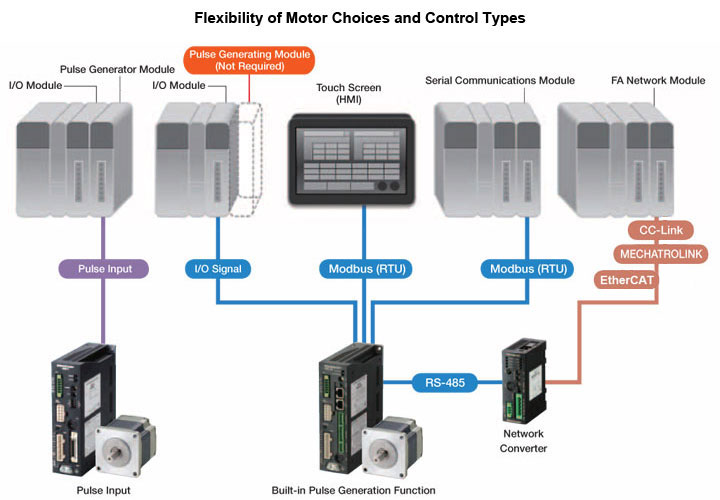
One FLEX driver, several ways to control it: pulse, I/O, Modbus RTU or CC-Link / MECHATROLINK / EtherCAT via a network converter
About the Oriental Motor Controllers & Network Drivers
Oriental Motor controllers and network drivers connect stepper, closed-loop and brushless motors to your PLC or industrial network. Network drivers let a PLC command position, speed and read status over a single cable, replacing pulse outputs and discrete I/O wiring.
Multi-axis controllers and network converters handle several axes from one connection, and Oriental Motor’s free setup software makes parameter setting, test operation and monitoring straightforward.
AB Automation integrates Oriental Motor networks with Mitsubishi Electric and other PLCs every day, so we can help you choose the right driver type and get the communication running quickly.
Oriental Motor groups its network-ready products under the FLEX concept. A FLEX driver has the positioning controller built in: operating data such as travel amount, speed and acceleration is stored inside the driver, so the PLC does not need a pulse-generating positioning module. The same driver can then be commanded in three ways: simple I/O signals, Modbus RTU over RS-485, or an FA network such as CC-Link, MECHATROLINK or EtherCAT through a network converter.
Beyond FLEX, Oriental Motor also offers drivers that connect directly to an FA network master. AZ Series drivers are available in EtherCAT (CiA402 drive profile), EtherNet/IP and PROFINET types, plus 2-, 3- and 4-axis EtherCAT multi-axis drivers, and the CVD Series has a 4-axis EtherCAT driver for PKP 2-phase and 5-phase stepper motors. Oriental Motor describes the two approaches as a 'motion system', where fast synchronised communication and interpolation are needed, and a 'field system', where each axis behaves like a network I/O slave and high-speed synchronisation is not required.
For robots built from AZ Series axes, the MRC01 robot controller adds kinematics on top. It controls in-house built articulated, SCARA and delta robots (and the MRC01-C version Cartesian/gantry robots), takes commands from a PLC over EtherNet/IP or from its own I/O, and is programmed with the MRC Studio software rather than ladder logic. MEXE02, the free support software, covers parameter setting, teaching, monitoring and backup for the driver side.
Key features
Multi-axis positioning
EtherCAT, RS-485 (Modbus RTU) and fieldbus / Ethernet connectivity
Network converters for multi-axis systems
Free setup and monitoring software
How to select a control method (selection guide)
Start with what the PLC already has and how the axes must move together. If the machine needs interpolated or tightly synchronised motion across several axes, choose a driver that connects directly to a motion network such as EtherCAT. If each axis simply moves to stored positions on command, a field-type connection through Modbus RTU or a network converter is usually enough and costs less.
Remember that FLEX drivers already contain the positioning function, so for point-to-point jobs you may not need a positioning module or pulse outputs at all.
1–2 axes, simple indexing, PLC with spare I/O: FLEX driver under I/O control (select stored data by inputs)
Several axes on a small PLC or HMI with an RS-485 port: Modbus RTU, up to 31 drivers on one line
PLC already running CC-Link, MECHATROLINK or EtherCAT: network converter to drive up to 12 or 16 FLEX axes
Synchronised or interpolated motion, fast cycle: AZ Series EtherCAT, EtherNet/IP or PROFINET drivers, or the multi-axis EtherCAT drivers
Existing pulse-output controller you want to keep: pulse-input driver (optionally with RS-485 for monitoring)
Custom-built SCARA, articulated or gantry robot: MRC01 / MRC01-C with MRC Studio
Pulse control vs network control: which should you choose?
Pulse control is familiar and simple: the PLC generates pulse and direction signals and the driver follows. It needs a pulse output or positioning module per axis and a multi-core cable per driver, and the PLC only learns about alarms or actual position if extra signals are wired back.
With network control, commands, parameters and status travel over one communication cable. The PLC can read alarm codes, position and load information directly, change speeds or positions without rewiring, and add axes by daisy-chaining. The trade-off is that someone must set up the network configuration and the data mapping, and troubleshooting needs basic network knowledge. For one or two axes on a tight budget, pulse still makes sense; as axes and diagnostics requirements grow, network control usually wins on wiring and commissioning time.
The network converter concept
A network converter (gateway) sits between the PLC's FA network and a chain of Oriental Motor RS-485 (FLEX) drivers. To the PLC it appears as one network node, for example a remote device station on CC-Link, while on the other side it talks Oriental Motor's own RS-485 protocol to the drivers.
This lets you put AZ Series, stepper, brushless and actuator products on CC-Link, MECHATROLINK or EtherCAT without a network-specific driver for each. Oriental Motor positions it for field systems such as index tables, conveyors and X-Y stages where axes do not need high-speed synchronisation.
One network node for up to 12 or 16 axes, depending on the converter
NETC01-CC runs in a 6-axis or 12-axis connection mode, set by a switch
Converters are set from the front panel or with MEXE02, and communication time can be monitored
Cutting wiring on multi-axis machines
On a pulse-controlled machine, every axis needs its own positioning output, pulse cable and I/O wiring back to the PLC. On a network machine, the same axes share one daisy-chained communication cable. Oriental Motor's 4-axis CVD EtherCAT driver goes further by putting four drive circuits in one 160 × 100 mm unit, and the AZ multi-axis drivers do the same for up to four AZ axes.
Fewer terminations mean fewer wiring errors during panel building and fewer loose connections to hunt down later, which matters for OEMs building the same machine repeatedly and for plants in India where maintenance teams often have to trace faults under time pressure.
Software for setup, monitoring and maintenance
MEXE02 is Oriental Motor's free support software for its data-setting drivers. From a PC you can edit operating data in a table, set parameters, jog and teach positions, run test operations and watch I/O, status, alarms and waveforms on several monitor screens at once. Settings can be saved and copied, which makes replacing a driver or building a second machine much quicker.
For robots, MRC Studio handles the robot side: initial setup of the mechanism, programming with simple command selection and checking operation with a 3D simulator. Because robot programs live in the MRC01, the PLC program can stay unchanged when the robot motion is edited.
Specifications
Direct FA network drivers (AZ Series)
EtherCAT (CiA402 drive profile, ESI file), EtherNet/IP, PROFINET (Conformance Class B, GSD file), Modbus TCP/UDP on DC input mini driver
AZ Series EtherCAT multi-axis controllers/drivers (4C = slim type)
2, 3 or 4 axes; 24/48 VDC
AZ Series EtherNet/IP and PROFINET drivers
Direct connection to EtherNet/IP or PROFINET masters for AZ motors and AZ-equipped actuators
PROFINET Conformance Class B
CVD4A-KED / CVD4AR-KED
CVD Series 4-axis EtherCAT driver for PKP 2-phase / 5-phase stepper motors (R = right-angle connectors)
24 VDC, 160 × 100 mm, 110 g
NETC02-CC / NETC01-CC
CC-Link network converters to Oriental Motor RS-485 (remote device station)
Ver.2: up to 16 axes; Ver.1.1: up to 12 axes
NETC01-ECT / NETC01-M2 / NETC01-M3
EtherCAT, MECHATROLINK-II and MECHATROLINK-III network converters
Up to 16 axes each
MRC01 / MRC01-C
Robot controllers for custom-built robots on AZ Series axes (articulated, SCARA, delta / Cartesian-gantry)
24 VDC, EtherNet/IP
MEXE02
Free support software for data setting, teaching, monitoring and backup of Oriental Motor drivers
Free download
Specifications are indicative. Contact us for the exact model, availability, lead time and pricing.
Use cases
Packaging
Multi-axis format change on a packaging machine
Guide rails and stops on a carton or pouch machine are moved by AZ Series axes on EtherCAT. The PLC sends new positions for each product format, and the absolute sensor means no homing after power-up.
Format change from the HMI without manual adjustment
Pharmaceutical
Index table on a pharma inspection station
A DGII hollow rotary actuator and linear axes are put on the plant's existing CC-Link network through an NETC02-CC converter. Each axis runs stored positions like an I/O slave, which is all an indexing job needs.
Adds axes without adding PLC positioning modules
Textile
Yarn guide and take-up axes on textile machines
Stepper axes for traverse and take-up on a winding or texturising machine are controlled over Modbus RTU from a small PLC or HMI, with speeds and strokes changed as data rather than by rewiring.
Recipe changes over one RS-485 line
Diamond & gems
Diamond inspection and sorting stage
An X-Y stage and rotary axis for stone positioning use AZ Series drivers so the controller can read position and alarm data directly. Closed-loop monitoring helps catch a missed position before it becomes a wrong measurement.
Position and alarm data visible to the host
Logistics & warehousing
Conveyor diverters with brushless motors
Brushless motor drivers with RS-485 run conveyor sections at speeds set over Modbus RTU, while the PLC reads load and alarm status for maintenance.
Speed changes and diagnostics without extra analog wiring
Automotive components
Custom SCARA for machine loading
An in-house built SCARA made from AZ Series axes is controlled by an MRC01. The line PLC starts programs over EtherNet/IP while the robot motion is programmed and tested separately in MRC Studio.
Robot and PLC programming split between engineers
Laboratory & life sciences
Laboratory sample handling
Compact AZ DC-input axes on a multi-axis EtherCAT driver move pipetting heads and trays in a benchtop instrument, keeping cabling inside a small enclosure manageable.
Up to four axes from one compact driver
General machinery
Retrofit of a pulse-controlled machine
An older machine with a pulse-output controller keeps its controller but moves to pulse-input AZ drivers with RS-485, so alarms and position can be monitored without rewriting the whole control program.
Better diagnostics with minimal control changes
Multi-axis machines
PLC-controlled positioning
Reducing wiring on OEM machines
Retrofits and upgrades
Case studies
Motor / component manufacturing
In-house SCARA and Cartesian robots on a gear and magnet assembly line
Challenge
Oriental Motor wanted to automate transfer and magnet assembly on its own standardised, modular production line. Commercial robots were too large for the compact process equipment, and programming in-house robots normally needs specialist kinematics knowledge.
Solution
Engineers built a 4-axis SCARA robot (about 450 mm reach) for transfer between processes and a Cartesian robot for magnet assembly, each controlled by an MRC01. PLCs manage the processes inside each machine and the whole line, while robot programs are written and tested in MRC Studio.
Result
Oriental Motor reports that the line could be downsized with robots sized to the equipment, a beginner could create a working robot program in about an hour, robot and PLC programming could be split between people, and robot changes no longer required PLC edits.
4-axis EtherCAT driver for automated chip inspection equipment
Challenge
A semiconductor machine builder using PKP Series stepper motors faced heavy wiring on multi-axis inspection equipment, extra inventory from one driver per motor, and customers asking for EtherCAT without changing the existing motors.
Solution
Oriental Motor proposed the CVD Series EtherCAT multi-axis driver, which combines four stepper drive circuits in one package, works with the existing 2-phase and 5-phase PKP motors, daisy-chains on EtherCAT and handles electromagnetic brake control and encoder input.
Result
Wiring and control for up to four motors were consolidated into one compact 24 VDC driver, with network commands replacing hard-wired pulse, direction and I/O signals.
SCARA and gantry robots for a sensor assembly line
Challenge
A factory team needed to raise production efficiency on a sensor assembly line while keeping footprint small and throughput high.
Solution
A horizontal SCARA robot and a vertical Cartesian/gantry robot were built from AZ Series motors, DGII rotary actuators, DR cylinders and EH grippers, all controlled by an MRC01 robot controller programmed in MRC Studio.
Result
Oriental Motor reports homing without extra home or limit sensors thanks to the absolute encoders, shorter machine time by running transfer and parts-setting in parallel, and programming that inexperienced users could manage.
Can Oriental Motor drivers connect to a Mitsubishi PLC?
Yes. RS-485 (Modbus RTU) and network driver types can be controlled from Mitsubishi Electric PLCs. As a Mitsubishi Electric channel partner as well, we set up both sides.
Why use a network driver instead of pulse control?
A network driver reduces wiring, lets the PLC read position, alarms and status directly, and makes it easier to change motion parameters from the PLC.
What is a network converter and when do I need one?
A network converter (for example NETC02-CC for CC-Link or NETC01-ECT for EtherCAT) translates your PLC's FA network into Oriental Motor's RS-485 protocol. Use one when you want several RS-485 (FLEX) drivers to appear as a single node on an existing network, typically up to 12 or 16 axes per converter.
Is MEXE02 software free?
Yes. MEXE02 is a free download from Oriental Motor. It is used to set operating data and parameters, teach positions, run test operation and monitor status, I/O, alarms and waveforms from a PC.
How many drivers can I connect over Modbus RTU?
Oriental Motor states up to 31 drivers can be connected to one serial communication module over RS-485 (Modbus RTU). In practice the count also depends on the cycle time your application needs.
Do Oriental Motor drivers support EtherCAT directly?
Yes. AZ Series drivers are available as EtherCAT drive-profile types (AC and DC input), as 2 to 4-axis EtherCAT multi-axis drivers, and the CVD Series has a 4-axis EtherCAT driver for PKP stepper motors. Other products can join EtherCAT through the NETC01-ECT converter.
Which network should I choose for a new machine?
Usually the one your PLC already speaks. If you need synchronised or interpolated motion, pick a direct-connection driver on a motion network such as EtherCAT; for simple positioning on a Mitsubishi CC-Link system, a CC-Link converter or Modbus RTU is often the simpler route. Share your PLC model and axis count and we will suggest the most economical option.